
Workflows introduce comprehensive versioning for both, the workflow structure and individual actions.
Designing a workflow in the Workflow Builder starts with an initial draft that can be modified as needed. Drafts cannot be used for claim assignment and must first be published. Publishing finalizes the changes and creates the first published version of the workflow.
Workflow versions follow a defined lifecycle. They always start as drafts and must be published before they can be used for claim assignment. Published versions are immutable. When changes to a published workflow are needed, a new draft needs to be created from the latest published version. Once published, the draft becomes the new, current workflow version used for claim assignment. Of course, drafts can be discarded instead.
It is important to note that the assignment API and assignment rules only assign to the current (⚠️latest published) workflow version.
Individual workflows can be temporarily deactivated. Assignments to deactivated workflows will be skipped in the assignment rules.
Workflows have unique names. Workflows and their versions are identified by UUIDs. Additionally, workflows have user-friendly version names composed of major and minor sequential version numbers. For example, v1.0, v1.1, v2.0, etc.
The version can be reviewed in the workflow overview and will appear as follows.
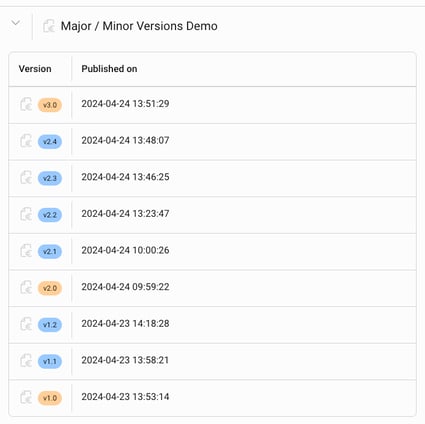
Major / Minor versions
With versioning, updates to specific actions within a workflow are applied to active claims running on earlier minor versions. However, changes to the workflow structure or settings only affect newly assigned claims and result in the creation of a new major version. Combined changes also result in a new major version.
For example, changes to customer message content or fees in v2.1 will be applied to claims running with workflow version v2.0 (the process definition will be "upgraded"), as well as changes from v2.2 to v2.1, and so on. However, changes in the major version v3.0 will not be applied to claims running with the latest v2.x version.
In other words, the major-minor version naming indicates how changes are applied. Active claims are automatically upgraded to the latest minor version within the same major version when it is published. New major versions, however, only apply to newly created claims. We plan to relax this limitation as we enhance the workflow functionality.
