
The workflow builder is the main tool for designing and modelling a specific dunning or communication process.
In addition to defining the general structure of dunning actions, detailed configurations can be applied. These include:
-
Communication content: Customizing messages sent during the dunning or communication process.
-
Fees: Applying specific charges at different actions.
-
Payment methods: Defining available payment options.
-
Scheduling: Defining timing rules fore the preferred dispatch time for each action.
-
Additional customizations: Tailoring other settings to meet specific requirements.
-
And much more...
The workflow builder interface
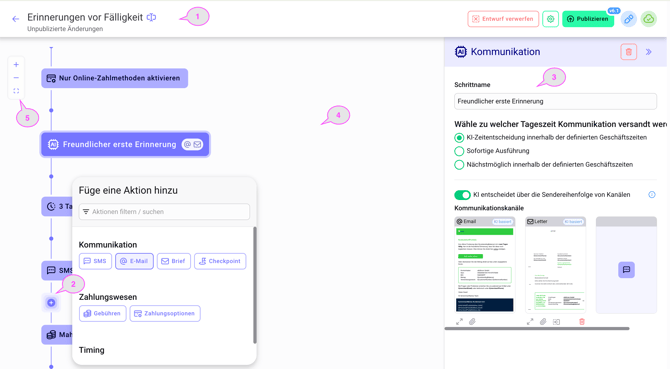
1: Topbar panel
Read-only actions:
-
Version selector
Editing Actions:
-
Rename Workflows
-
Discard draft
-
Workflow settings
-
Publish
2: Workflow
Displays all available actions. Actions, like communications, time, checkpoints, configurations and others can added into the canvas to create an individual workflow.
3: Configuration sidebar
This sidebar will be displayed after clicking on an action and will expand from the right side of the screen. It displays all configured settings for the selected action.
4: Workflow canvas
This is the main area for displaying the process flow of the selected workflow.
